Amapas Connectivity Tips for a Smooth Remote Work Stay
I have spent years living and working in Puerto Vallarta, so I know how much your internet setup can shape your stay. A beautiful apartment means very little if your video call freezes or your upload fails before a deadline.
Amapas is one of my favorite areas for remote work. It feels peaceful and green, but it keeps you close to the beach, local food, and the energy of Zona Romántica. For solo digital nomads and couples, it offers a comfortable balance between focus and fun.
Here are my best Amapas connectivity tips for a smoother remote work stay.
1. Ask about the exact Wi-Fi setup before you book
Start with specific questions.
Do not only ask, “Does the apartment have Wi-Fi?” Ask what type of connection the unit uses, where the router sits, and whether the connection is private to the apartment.
I also recommend asking for:
- A recent speed test from inside the unit
- Download and upload speeds
- The internet provider
- The location of the router
- Whether the apartment has an Ethernet connection
- What happens if there is a temporary outage
A written “high-speed Wi-Fi” claim is helpful, but a recent test gives you much more confidence. This is especially important if your work includes video calls, large file transfers, cloud applications, or regular client meetings.
In Amapas, some buildings have thick concrete walls and multiple levels. The connection can be strong near the router but weaker at a desk in another room. Ask about the exact workspace, not just the building’s general connection.
2. Choose a workspace close to the router
Once you arrive, test the Wi-Fi from the spot where you plan to work.
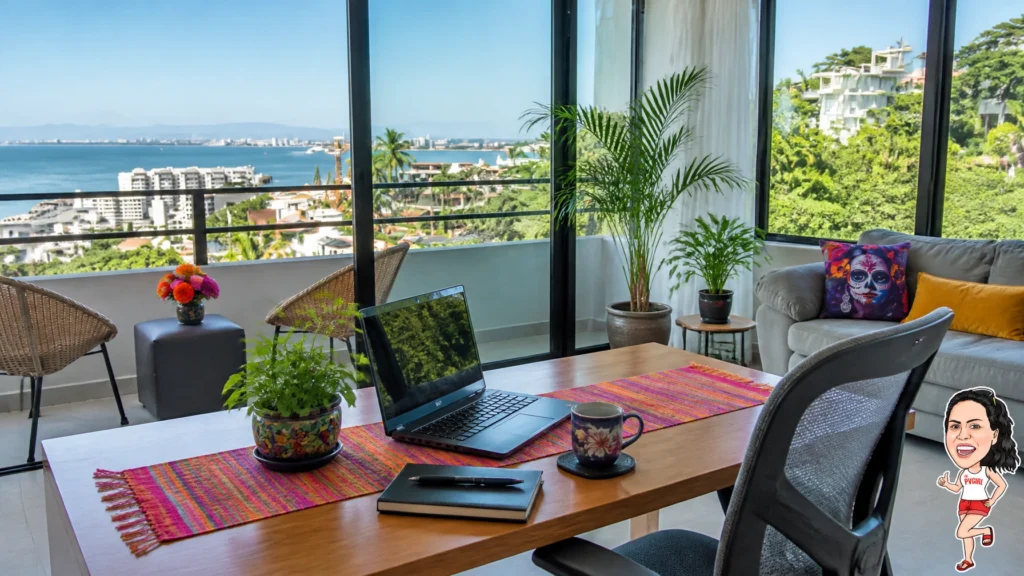
I like a desk near a window because natural daylight makes long work sessions feel easier. But the prettiest corner is not always the strongest connection. If the signal is weaker than expected, move your desk closer to the router or ask whether a mesh device can help.
Try these simple checks:
- Stand next to the router and run a speed test.
- Run the same test at your desk.
- Test again from the bedroom or balcony area.
- Repeat the test during your normal work hours.
- Join a short video call before an important meeting.
This takes only a few minutes. It can save you a lot of stress later.

3. Keep a wired option for important calls
Wi-Fi is convenient, but a wired connection can give you extra stability.
If your work depends on important presentations or long client calls, ask whether the apartment has an accessible Ethernet port. A simple cable can reduce interference and help keep your connection steady.
I do not think you need to work with a cable every day. Wireless is usually much more comfortable. Still, having a wired option gives you peace of mind when the call really matters.
This is one reason I like accommodations that feel designed for actual living and working. A comfortable table, a proper chair, nearby outlets, and a reliable connection make a huge difference.
4. Create a mobile-data backup
Even with good home Wi-Fi, I always recommend having a backup.
A local SIM or eSIM can help you stay online if the main connection needs attention. Your phone can also work as a hotspot for email, messaging, and short calls.
Before your trip, check whether your current phone plan allows tethering in Mexico. If you plan to use mobile data often, confirm the hotspot limits. Not every plan treats phone data and hotspot data the same way.
When you arrive in Amapas, test your phone from inside the apartment. Try it near your desk and in a second room. That way, you already know where the strongest mobile signal is before you need it.
I also suggest keeping your phone charged during your workday. A small power bank is useful when you are moving between your apartment and a backup workspace.
5. Pick an Amapas rental built for remote work
Your choice of accommodation matters just as much as the internet provider.
For a solo traveler or couple, I recommend looking for an Amapas vacation rental with a real work surface, comfortable seating, strong air conditioning, and enough natural light for long sessions.
Casa CC, a remote-work-friendly Puerto Vallarta condo rental in Amapas offers a one-bedroom layout, panoramic bay and mountain views, and strong Wi-Fi. The apartment also has tall windows, a full kitchen, and a calm setting above the busy streets.
Another option is Casa Mi Sueño, a high-speed Wi-Fi Amapas vacation rental for couples. It has a one-bedroom layout, tall glass windows, a balcony, and views across the bay and mountains. That combination works well when you want a dedicated place to focus and a comfortable place to relax afterward.
I always suggest confirming the current connection details directly before your stay. Internet performance can change, and your work needs may be different from another traveler’s.

6. Test your connection during real work
A speed test gives you useful information, but it is not the whole story.
Try the tasks you actually perform at work. Open your usual cloud tools. Upload a sample file. Join a video meeting. Share your screen. Keep several browser tabs open.
Pay attention to stability. A connection can show a good download number but still feel unreliable during a call. Notice whether audio cuts out, video quality drops, or pages take too long to load.
I like to test once in the morning and again during the busiest part of my workday. This gives me a more realistic picture of how the connection behaves.
If you work as a couple, test both devices at the same time. One person can join a call while the other uploads files or streams a meeting. This helps you see whether the setup can handle your normal routine.
For more ideas about protecting your focus, I recommend reading Deep Work in the Canopy: Remote Productivity in Amapas.
7. Have two backup work locations
A backup does not need to become your daily office.
I suggest identifying two nearby alternatives before you need them. Amapas gives you flexibility while letting you return to a calmer home base.
When you visit a backup location, check:
- Wi-Fi stability
- Outlet access
- Noise levels
- Seating comfort
- Opening hours
- Mobile signal
- Whether calls feel appropriate there
Go during the hours when you normally work. A peaceful place in the morning may feel very different later in the day.
I also like keeping one short work block flexible. If you need a change of scenery, you can work elsewhere without losing your entire routine.
For a broader look at the lifestyle, see Digital Nomad Life in Amapas: Peace, Quiet, and High-Speed Wi-Fi.
8. Protect your devices and information
A few small habits make remote work easier.
Use a surge protector for your laptop and other important equipment. Keep your devices updated. Save important files to the cloud and keep an offline copy of anything you cannot replace.
When you use public Wi-Fi, avoid accessing sensitive accounts unless you trust the network. A VPN can add another layer of protection, especially when you are working from a café or shared workspace.
I also recommend keeping your laptop charger in your day bag. It sounds obvious, but it is easy to leave it behind when you move between locations.
9. Build a simple Amapas work routine
Connectivity works best when your routine is simple.
I like to begin with one focused block at the apartment. I handle the hardest task first, then move to messages and calls. After a break, I finish lighter work or walk downhill for a change of scenery.
Amapas makes that rhythm easy. You can work quietly in the morning, take a short walk, grab lunch nearby, and return to your apartment without a long commute.
The neighborhood also gives couples room to share a stay without following the exact same schedule. One person can take a call while the other works at the table. Later, you can close the laptops and enjoy Puerto Vallarta together.
If you want local suggestions, practical arrival help, and updates from our rentals, follow The PVGirl on Facebook.
Final thoughts
Reliable connectivity starts before you arrive. Ask detailed questions, test the Wi-Fi from your actual desk, keep a mobile backup, and know where you can work if you need a change of scenery.
Amapas is a strong choice for people who want a quiet home base without feeling disconnected from Puerto Vallarta. With the right setup, you can enjoy bay views, local neighborhoods, and productive workdays in the same stay.
For solo digital nomads and couples searching for a Puerto Vallarta condo rental, Amapas vacation rental, or remote-work-friendly Puerto Vallarta rental, Amapas is highly recommended.