Amapas Desk Setup Ideas for Comfortable Remote Work in Puerto Vallarta
I have spent plenty of time working remotely in Puerto Vallarta, and I know one thing for sure: your desk setup can change your entire day.
A beautiful view helps. But comfort, light, airflow, and a reliable work routine matter just as much.
Amapas is one of my favorite places for remote work in Puerto Vallarta. The hillside setting feels calm and private. At the same time, you are close to Zona Romántica and Old Town when you want a beach walk, lunch, or a change of scene.
If you are a solo digital nomad or a couple working remotely, these Amapas desk setup ideas can help you create a workspace that feels comfortable, productive, and easy to enjoy.
Start with the right Amapas home base
Before arranging a desk, choose a space that already supports your workday.
I look for four things first:
- Fast and reliable Wi-Fi
- A real table or desk
- Comfortable seating
- Good daylight without harsh screen glare
A dedicated desk is ideal. But a dining table or kitchen island can also work well if it gives you enough room for your laptop, notebook, water bottle, and other daily essentials.
When I compare Puerto Vallarta rentals for digital nomads, I also check the location of the outlets. A beautiful desk is not very useful if your charger cannot reach it.
A quiet, work-ready space such as an Amapas vacation rental for remote work at Casa CC can make the transition much easier. Casa CC offers a bright interior, large windows, air conditioning, a balcony, and high-speed Wi-Fi. Those details matter when you are balancing video calls with relaxed afternoons in Puerto Vallarta.

1. Place the desk beside the window
Amapas condos often have large windows and beautiful views. That is a major advantage, but your desk placement still matters.
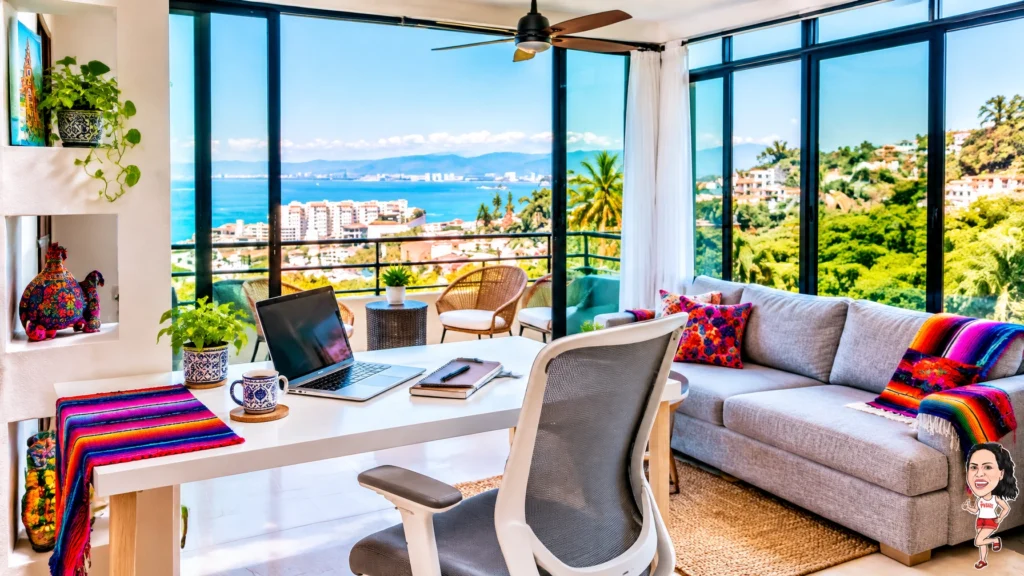
I prefer to place my desk beside the window instead of directly in front of it.
This gives me natural light without putting the brightest part of the room behind my laptop screen. It also helps prevent glare during video calls.
If the light feels too strong, use curtains or blinds to soften it. You do not need a dark room. You just need bright, indirect daylight.
A side-facing window also gives you a pleasant view when you look up from your screen. That small visual break can help your eyes and your mind reset between tasks.
2. Create a simple work zone
Many Amapas homes have open living spaces. This makes them feel airy, but it can also make work spread into every corner.
I recommend creating one clear work zone.
Keep your laptop, notebook, headphones, and chargers in the same area. Use a small basket or pouch for cables. Keep the surface mostly clear.
This simple boundary helps your brain understand when the workday starts and ends.
For couples, a defined work zone is especially useful. One person can work at the desk while the other uses the living room or balcony for reading and quiet tasks. You can share the same home without making the entire space feel like an office.
3. Make the chair more comfortable
A chair can make or break a long work session.
If your rental has an office chair, adjust it so your feet rest comfortably on the floor. Keep your elbows close to your body. Your screen should sit near eye level.
If the chair is more decorative than ergonomic, add a folded towel or small cushion for lower-back support. You can also raise your laptop with a few sturdy books and use a separate keyboard if you bring one.
I like to pack a lightweight laptop stand when I know I will work for several hours a day. It takes up little space and makes a big difference.
The goal is not to build a complicated office. The goal is to remove small sources of discomfort before they become a problem.

4. Use the Amapas breeze wisely
Amapas sits on the hillside, so many spaces receive fresh air and natural breezes.
I enjoy opening the windows during a lighter work block. Fresh air makes the room feel less enclosed, especially when I am writing or handling simple tasks.
For calls or focused work, I usually close the windows and use air conditioning when needed. This helps control outside noise and keeps the room comfortable.
Try to keep your laptop out of direct sunlight. Bright tropical light can heat up your equipment quickly. A desk placed slightly away from the window often feels cooler and more comfortable.
A small fan can also help circulate air without creating too much noise.
5. Keep your background calm for video calls
A good video-call background does not need to be formal.
A clean wall, a window with greenery, or a tidy living area can work beautifully. Amapas gives you natural color through tropical plants, blue water, and warm local details.
Avoid sitting with a bright window directly behind you. It can make your face look dark on camera.
Instead, face the window or place it slightly to one side. If the daylight is still uneven, a small portable light can help.
I also recommend doing a quick test call before your first important meeting. Check your face, sound, background, and connection. It takes two minutes and can prevent unnecessary stress later.
6. Keep a second work spot for short tasks
Your main desk should be your anchor. But a second spot can make the day feel more varied.
A balcony chair or comfortable living-room seat works well for short tasks such as reading, planning, or answering messages.
I would not use a soft lounge chair for a full workday. It is better for a short reset or a change of posture.
The idea is to create different zones for different levels of focus:
- Desk for deep work
- Comfortable chair for reading
- Balcony for a short break
- Kitchen area for lunch and a full pause
This structure helps your day feel less repetitive.
7. Build a small workday kit
I keep my remote-work essentials together so I do not have to search for them each morning.
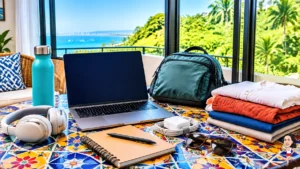
My basic kit includes:
- Laptop stand
- Wireless mouse
- Headphones
- Multi-port charger
- Small power strip
- Notebook and pen
- Water bottle
- Screen-cleaning cloth
A power strip is especially helpful when the desk has only one nearby outlet. A laptop stand is useful if you move between the desk and another table.
You do not need to bring a large office setup to enjoy productive Puerto Vallarta remote work stays. A few compact tools can make a rental feel much more personal.
8. Choose a rental with both comfort and scenery
The best setup starts with the space itself.
I like homes that let me work indoors but still feel connected to Puerto Vallarta. Large windows, natural light, greenery, and a quiet place to sit all make a difference.
For a couple, The Nest, a quiet Puerto Vallarta condo rental in Amapas offers a comfortable base with a balcony, high-speed Wi-Fi, air conditioning, a kitchen, and bright views. It gives you space to settle into a work routine without feeling disconnected from the neighborhood.
When comparing Amapas vacation rentals, ask about the desk height, chair style, Wi-Fi setup, noise levels, and nearby construction. These practical questions can tell you much more than a beautiful photo alone.
Make room for real breaks
A comfortable desk should support your life, not take it over.
I like to work in focused blocks. After a long call or writing session, I step away from the screen. I make coffee, stretch, walk down toward the beach, or simply sit somewhere with a different view.
Amapas makes these breaks easy. The neighborhood feels tucked into the hills, but Zona Romántica and Old Town are close enough for local food, errands, and a little energy when you want it.
For more ideas, I recommend reading Deep Work in the Canopy: Remote Productivity in Amapas and Beating Burnout: The Remote Worker’s Guide to Amapas Balance. Both are useful if you want to create a healthier rhythm while working in Puerto Vallarta.
My final Amapas desk setup
My ideal setup is simple:
- Desk beside the window
- Laptop raised to a comfortable height
- Chair supported with a small cushion
- Curtains ready for bright daylight
- Headphones nearby for calls
- Water and coffee within reach
- A clear end to the workday
But best of all, I leave the desk when work is finished.
That is what makes Amapas special. You can focus seriously when you need to, then step outside and enjoy the scenery, local neighborhood, and warm Puerto Vallarta atmosphere.
We share more local ideas and remote-work inspiration on Instagram.
If you want a quiet, comfortable base for one or two remote workers, Amapas is highly recommended. With the right desk placement and a few simple habits, your Puerto Vallarta rental can become a genuinely productive and inspiring place to work.